


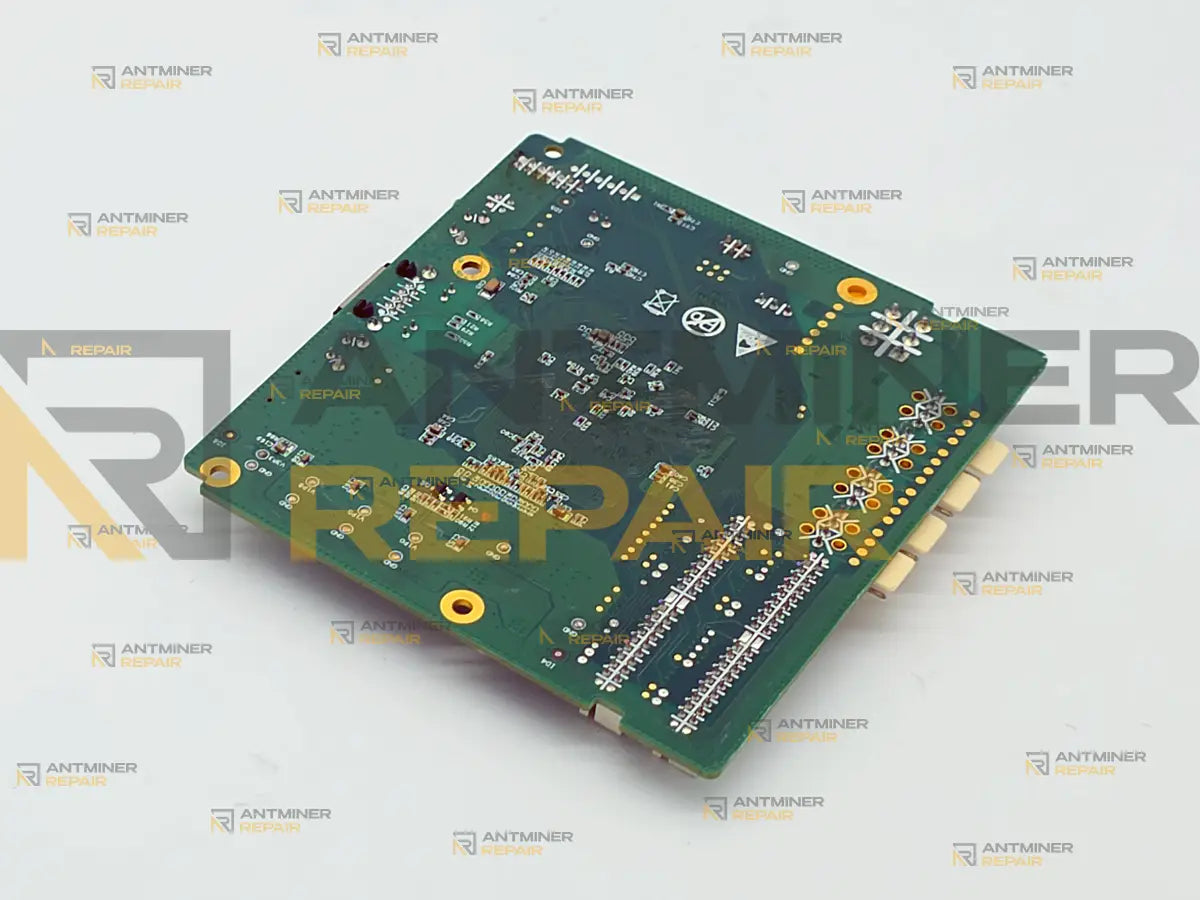
Looking for Xilinx control board repair on an Antminer? A Zynq board is swapped rather than repaired — a tested board costs the customer less than component-level work on a dead SoC. We confirm the control board is the actual fault, fit the matching C52, C55, C87 or C99 board, then validate the miner under load.
Two Antminers with the same model on the sticker can carry two different control boards, so the first question on any suspected Xilinx fault is what is actually bolted into the chassis. This one is easy to spot from outside: a memory card slot on the front panel, next to the Ethernet jack. That slot narrows it to two families, and the marking on the processor settles which of the two you have.
Making sure it is a Xilinx board
One check settles it, and it is not the card slot. Read the marking on the main processor: a Xilinx board says XILINX and ZYNQ, with a part number starting XC7Z. Anything else on the board is circumstantial.
The board most often mistaken for this one is CVITEK. It also carries a card slot on the front panel, it is also a single PCB, and from the port edge the two are the same object — the processor marking is all that separates them. Owners have killed working boards by writing a CVITEK image onto a Zynq board or the reverse, and no further flash undoes that. If the marking is hard to read, photograph the chip and the port edge and send the pictures with your enquiry; we would rather identify the board for you than have you order the wrong one.
The full four-family identification table, and the map of which miners carry which board, live on the hub: how to tell which Antminer control board you have. If yours turns out to be one of the other families, each has its own page — CVITEK CV1835 control board replacement, Amlogic A113D control board replacement and BeagleBone control board replacement.

Is it the control board?
A dead control board writes no log and shows no error, because it never gets far enough to write one. The symptom is an absence, and it comes in four shapes:
- Nothing at all. No web interface, no address from DHCP, no answer to a ping or a network scan, and the IP report button produces no announcement where a working board would broadcast one
- It starts and never finishes. The miner reboots in a loop, or sits with the fault light on and never serves a page
- It comes up and cannot see the chains. The interface answers, but one, two or all three hashboards are missing
- It comes up clean and mines nothing. This one is specific to Xilinx. The board boots, the web interface answers, the hashboards are healthy — and the hashrate sits at zero, because the driver modules that reach the FPGA never loaded. No amount of reflashing addresses that, because the fault is in the board rather than in its software
Then the part that most pages skip. A dead power supply and a failed hashboard produce the same outward picture as a dead control board — a miner that will not come up. Spinning fans do not clear the power supply either, because on these machines the fans can run from their own line while the board has no supply at all. Voltages measuring correctly do not clear the board: a Zynq controller can read identical to a working one on every test point and still refuse to boot. That is why the work starts with a diagnosis instead of a part. We fit a known-good Xilinx board of the same generation and retest — if the miner comes up, the board was the fault; if the fault survives the swap, it never was. Bitmain publishes the same method for its own machines, and it needs a second known-good board and a second chassis, which is exactly what an owner with one miner does not have.
Why replacement, not repair
The reason is arithmetic, not capability. We can follow a Zynq board through its start-up sequence and say which stage it dies at. What we cannot do is make component-level work on that board come out cheaper for you than a tested board does. The processor by itself, bought as a component from a distributor, costs more than half of what a complete working board costs — before anyone has removed the old one, and a Zynq package is BGA rework rather than something you touch with an iron. The memory beside it costs a few dollars. So the bill for that work is not parts, it is bench hours and equipment, and at the end of it you have a board with a reworked joint on it instead of a board that already works.
Two things belong here rather than in the small print.
Some faults really are worth working on, and we will tell you when yours is one. A cracked Ethernet jack, a fatigued ribbon header, a damaged card slot — those are localised, and the guides written for this exact board recommend re-soldering them rather than scrapping the board. They also warn that a re-flowed joint can crack again within days of going back under load, which is the reason we do not build a service around that outcome. It is also why the board is diagnosed before anything is fitted, rather than sold to you on the strength of a description.
The arithmetic depends on which miner you own. On a Hydro machine it is not close — the board is a rounding error against what the miner is worth, and those units are worth keeping alive. On an older air-cooled S17 or S19 the gap between a control board and a working second-hand miner of the same model has narrowed to the point where it is a fair question, and we would rather you ask it before shipping than after. What has not narrowed: a dead unit sold for parts often costs more than a tested board, so buying a broken miner as a donor is usually the worst of the options.
The Xilinx revisions
Bitmain shipped this platform under a series of board codes. They share a processor family and a connector layout, which is why sellers list them interchangeably, and physically an S17-era board will seat and run in an S19-era machine. But it will only run custom firmware. Bitmain's own stock image does not install on a C52 board in a 19-series miner, so fitting an earlier-generation board commits that machine to a custom build for good. That suits most owners who come to us, because a custom build is what they wanted anyway — but it is not reversible by reflashing, and you should know it before the board goes in. If staying on stock firmware matters to you, say so when you send the miner and we will fit a board of the matching generation instead.
| Board code | Miners it has been supplied for | Notes |
|---|---|---|
Ctrl_C41 | S9, T9, T9+ | Earliest generation. A different Zynq part from the S17 and S19 boards |
Ctrl_C92 | S9, T9, T9+, E3, S9 Hydro | The one Hydro machine that does not take a C59 or C89 board |
Ctrl_C49 | S15, T15, S17, S17 Pro, T17 series | 17-series generation |
Ctrl_C52 | S17, S17 Pro, T17 series, S19, S19 Pro, S19j, S19j Pro, S19a, Z15, T15, D7 | Model lists differ between sellers — treat as indicative. The Z15 is the firm case: it runs on this revision and no later one |
C55 | S17, S17+, S17e, S17 Pro, T17, T17+, T17e, S19, S19 Pro, L7, D7 | The bridge between the 17 and 19 series |
Ctrl_C87 | S19, S19 Pro, T19, S19j, S19j Pro, S19a Pro, S19k Pro, S19 XP, L7, D7 | Sellers describe it as the later revision covering the 19 series. One vendor also lists it against T17 and T17+ |
Ctrl_C99 | S19, S19 Pro, S19j, S19j Pro, S19 XP, S19k Pro, T19, T9+, L7, D7 | Same generation as C87 |
C59 / C89
| The Hydro range, on its own page | Longer board for liquid-cooled machines. C89 supersedes C59 |
Read that table as a guide, not as a promise about your machine, and here is why. Bitmain never published a model-to-board list. The lists above come from the people who supply the boards, they do not agree with each other at the edges, and the same model number left the factory with a Xilinx board in one production run and a BeagleBone, Amlogic or CVITEK board in another. The sticker on your miner narrows the field. Only the board itself settles it.
Hardware Notes
| Specification | Details |
|---|---|
| Board family | XIL — Xilinx. One of Bitmain's four control board families, alongside Amlogic (AML), BeagleBone (BB) and CVITEK (CV) |
| SoC | Xilinx Zynq-7000. XC7Z007S on the 17 and 19 series boards, XC7Z010 on the S9 generation. Two ARM Cortex-A9 cores and FPGA fabric on one die. On the 17 and 19 series boards the package sits at designator U1 and reads XILINX ZYNQ XC7Z007S CLG225
|
| Why the FPGA matters | The only Bitmain control board family with programmable logic. Job dispatch to the chains, the voltage ID line, fan PWM and the I2C bus all run through it, which is why a board can boot perfectly and still hash nothing |
| System memory | Not published by Bitmain and not listed by suppliers. We would rather leave this blank than quote a figure we cannot verify |
| Firmware storage | A microSD card in a front-panel slot. Later boards also run from onboard NAND without a card fitted |
| Ports and controls | Ethernet, the card slot beside it, an IP report and reset button, red and green LEDs. Which side of the Ethernet jack the slot sits on varies by batch |
| Hashboard interface | Three 18-pin ribbon headers, one per chain — the same 18-pin cable used from the S9 generation onward |
| Other connections | Four fan headers, a power extension lead from the PSU, and a separate voltage regulating lead |
| Seller part codes |
Ctrl_C41, Ctrl_C49, Ctrl_C52, C55, Ctrl_C87, Ctrl_C92, Ctrl_C99. Hydro boards use C59 and C89
|
| Cross-family fit | None. An Amlogic-era image on a Xilinx-era board, or the reverse, is a reliable way to kill a working board — and CVITEK boards are the ones most often mistaken for these |

Liquid-cooled machines run this same Zynq platform on a physically longer board, sold as C59 and C89, which will not drop into an air-cooled chassis. Those have their own page: Antminer Hydro C59/C89 control board replacement.
Bricked after a firmware update?
There is one Zynq-specific way an update turns into a hardware fault: an interruption partway through a card recovery can damage the one-time-programmable region of the processor, and no reflash reaches that. If your unit needs software work rather than hardware, that is covered in our Antminer firmware section. Everything else about a miner that went down during an update — why nobody can judge it from a description, and what decides between a restore and a new board — is on the hub: bricked Antminer control boards, and what settles it.
Which boards, and what to check before ordering
We cover any model and any revision on this platform. There is no supported-models gate here, and nothing to check against a list before you contact us.
Matching only becomes your problem in one situation: you are buying a bare board and fitting it yourself. Then three things have to line up — the board family (the Zynq marking, not just the presence of a card slot), the generation, and the physical format, because a Hydro board will not go into an air-cooled chassis and an S9-era board is not the same part as an S17 or S19 one. Ordering by miner model alone is how people end up with a board that will not seat or will not take the connectors. If we are doing the replacement, matching the board to your miner is our job, not yours. Send the machine and we will work out what belongs in it.
What happens after intake
- Intake and incoming inspection. We record the condition as received, the board code and processor marking, the connector layout and any visible damage, along with what the miner was doing when it stopped
- Diagnosis. We establish whether the control board is the fault rather than assuming it: separating it from the power supply and the hashboards with a known-good board, and where the machine does not start at all, following the start-up sequence through the service port to see which stage it fails at
- Fitting. The correct Xilinx board for your miner and its generation goes in, and the connections are checked
- Firmware and configuration. The board is brought up on the right configuration for the machine it is going into
- Validation under load. The miner runs under real mining load, and we check for all hashboards present and a stable hashrate — not just a board that boots — before it ships back
Before you ship, two things we would rather you heard from us
Your old board is disposed of. We do not keep removed boards in storage. If you want yours back, say so before the work starts — once it is gone we cannot retrieve it.
Expect the hashboards to need attention too. In the units that reach us, a control board fault rarely arrives on its own, and that is the honest reason turnaround stays at 4-5 business days rather than being quoted as a same-day swap. It is not an upsell, it is the shape of the actual work: one intake, one diagnosis, one shipment, instead of fitting a board and finding the real problem afterwards. If your miner needs board-level work as well, we handle both in the same visit.
All work is performed personally by Alex, who has been servicing ASIC miners since 2019. See credentials →
Send the whole miner rather than the board on its own. Bitmain gives the same advice for its own service, because a board tested by itself carries no guarantee that it will work in your specific machine, and a fault that arrived alongside the board gets missed entirely when only the board travels. Contact our repair team today and get your miner back to full power.