


Antminer Repair
Antminer S21 Firmware Unlock and Recovery Service
Antminer S21 Firmware Unlock and Recovery Service
By placing your order you agree to our Terms of Service, Warranty Terms and Refund Policy.
Drop off available in Fort Lauderdale, FL (2141 NE 51st Ct).
Repair guide last verified:
▸How to ship your hardware
Share


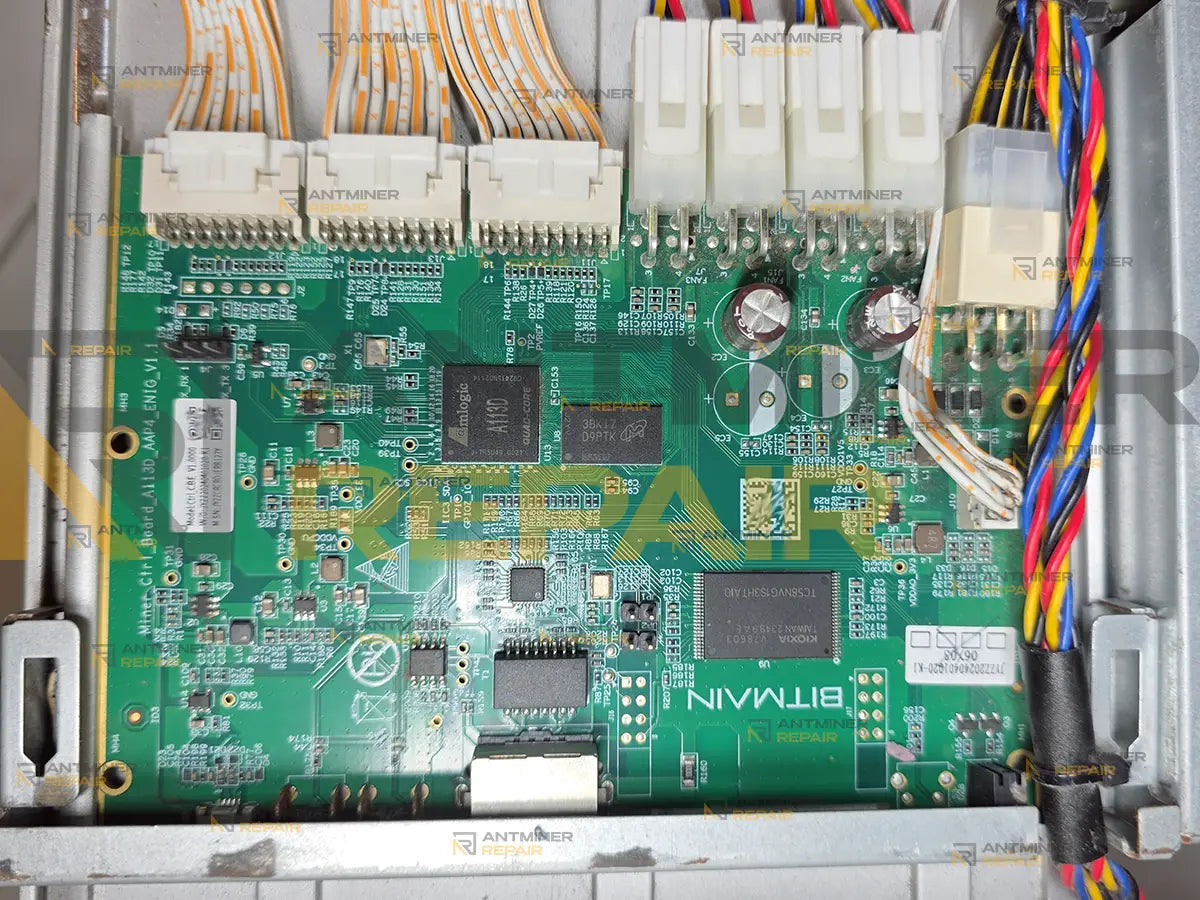
Stock firmware on an Antminer S21 can mark a working hashboard as failed and refuse to start the miner. The board is not the fault, and replacing it changes nothing. We downgrade the firmware on your control board, which removes the verdict along with the build that produced it. If that does not bring your board back, you get a new control board instead.
An Antminer S21 firmware unlock is the job to ask for when the miner has stopped believing its own hardware. Recent stock builds keep a running count of failed chip detections on each chain, and once that count is reached the chain is marked out for good — the log even tells the owner to send the board in for repair. On our bench the same board very often runs. What has actually failed is the software verdict sitting on the controller, and that is what the downgrade removes.
This covers every 21-series miner running the Amlogic A113D controller: S21, S21+ (S21 Plus), S21++ (S21 Plus Plus), S21 Pro, S21 Pro+ (S21 Pro Plus), S21 XP, T21, and the immersion versions S21 Imm and S21 XP Imm. Hydro units are the one exception — they run a C59/C89 control board rather than this one.
It is also the answer when an S21 has gone dead after a firmware update, when it will not save a pool no matter what you type, or when it looks bricked and no longer shows a web interface at all.
Is it really the hashboard?
Most people arrive here after reading a line in the kernel log that names repair, or after a board that hashed yesterday stopped being detected today. Those two things feel like hardware and are very often not. A board that is genuinely dead does not usually recover its chip count when the controller stops counting against it, and a board that is genuinely alive does not become dead because a counter reached ten.
The honest position is that nobody can tell which of the two you have from a description, including us — but unlike a dead-board diagnosis, this one is cheap to settle. That is the whole argument for sending the small board rather than the machine.
"COMMON ERROR" when you save a pool on an Antminer S21
You open the miner's web interface, type a pool address, press Save — and a red COMMON ERROR appears in the top right corner. No explanation, no code, no detail. Go back to the pool page and the fields are empty again, exactly as they were before you started.
Nothing you type is being kept, and it has nothing to do with pools. The same thing happens with the network settings, with the password, with anything the miner is asked to remember. The area on the controller that stores configuration has stopped accepting writes, and the interface has no vocabulary for saying so, so it says COMMON ERROR and leaves you to guess.
This one is worth recognising early, because it is routinely mistaken for a pool problem, a wallet problem or a firewall problem. People spend days checking the network before noticing that the miner never accepted the address in the first place. A machine in this state has usually also lost its identity — check whether the MAC starts with 02: and the serial reads Unknown. If both are true, the configuration area is the fault, not your pool.
"chain 1 find asic error count 10, you should send it to repair"
This is the line most owners are holding when they find this page, and it repays reading carefully, because it is the firmware's conclusion rather than a measurement. The controller counts failed chip detections on each chain. Once that count reaches its limit the chain is marked out, start-up stops before the chips are ever reached, and the log prints the sentence above.
Here is how it looks in the miner's own log, taken from a machine that arrived in exactly this state:
2015-01-01 00:00:29 read board name A3HB70501
2015-01-01 00:00:30 i2c_sim_init start
2015-01-01 00:00:30 i2c_sim_init end
2015-01-01 00:00:30 eeprom chain:0, pt1ok=1
2015-01-01 00:00:30 eeprom chain:1, pt1ok=1
2015-01-01 00:00:30 eeprom chain:2, pt1ok=1
2015-01-01 00:00:30 eeprom load ret:0
2015-01-01 00:00:30 miner type: Antminer S21 XP
2015-01-01 00:00:30 miner:A3HB70501,board_name:A3HB70501
2015-01-01 00:00:30 chain 1 find asic error count 10, you should send it to repair
2015-01-01 00:00:31 power open power_version = 0xc1
Read the four lines above the verdict. The EEPROM on all three chains is read successfully — pt1ok=1 on chain 0, chain 1 and chain 2 alike — and the board identifies itself correctly. One line later the firmware sends chain 1 for repair. Nothing between those two lines measured a single chip. The date reads 2015 because a miner in this state cannot keep its clock either.
The chain number and the count differ between machines — chain 0 or chain 2 in place of chain 1, a different figure in place of ten. It is the same fault whichever numbers appear in your log.
What the line does not tell you is whether the chips are actually dead. Detection can fail for reasons that have nothing to do with the silicon and that are no longer present by the time you read the log. Once the limit is reached the firmware stops asking, so nothing that happens afterwards changes its mind — including the board being perfectly capable of working. Boards arriving here under this verdict frequently report a full chip count once the build holding the verdict is gone.
That is what makes this line worth a second opinion rather than a purchase order for a new hashboard.
"Not enough chain, exit." — the miner that never finishes starting
This is the harder of the two states. Once a chain has been marked out, the miner stops during start-up instead of running on the boards it still has. The log ends on Not enough chain, exit. followed by basic init failed, and that is as far as it gets.
From outside it looks like an S21 bricked by a firmware update. There is no web interface — so there is nothing to log into, nothing to reconfigure, and no way to put a different build on the machine through the front door. Every remote option assumes an interface that is no longer there.
This is the case people describe as a dead miner after updating, and the hardware underneath is usually intact. It is also the reason this work cannot be done over the network: there is no longer anything on the other end to talk to.
What you see when the firmware has locked the miner
Quick symptom checklist
- You enter a pool and press Save, and a red
COMMON ERRORappears in the top right corner with no explanation. The fields come back empty. - The miner will not save a pool, a worker name, or network settings — nothing you type survives.
- The MAC address shown by the miner starts with
02:instead of the address on the label. - The serial number reads
Unknown. - The clock is stuck on
2015-01-01and stays there through every reboot. - The controller restarts by itself every few minutes.
- Every board shows zero chips at once — three at a time, not one.
- After a firmware update there is no web interface at all, and the miner never finishes starting.
The digits inside these messages differ from machine to machine — a different chain number, a different count. It is the shape of the line that identifies the fault, not the numbers in it.
What the log is telling you
You do not have to act on any of this. It is here so you can recognise the state your controller is in before you decide to send anything.
| What you see | What it usually means | What the downgrade does with it |
|---|---|---|
COMMON ERROR after pressing Save |
The configuration section is not being written. Nothing you type is kept, whatever you type. | Replaces the build that stopped accepting configuration with one that accepts it. |
chain 1 find asic error count 10, you should send it to repair |
The counter for that chain has reached its limit and the chain is marked out permanently. Start-up stops before the chips are ever reached. | Removes the build that is holding the verdict, so the chain is detected from scratch instead of being skipped. |
Not enough chain, exit. followed by basic init failed
|
With one chain marked out the miner refuses to come up at all, so there is no web interface left to work through. | This is the state that cannot be reached over the network. The downgrade goes in through the board itself, not through the interface. |
Open miner sn file /config/mac error |
The controller cannot read its own identity, which is why the address starts with 02: and the serial reads Unknown. |
The factory serial and MAC sit in a separate area that the downgrade does not rewrite, so the miner may still report a generated address and an Unknown serial afterwards. It mines at full rate either way. |
ERROR_ASIC_NUM: asic number is not right or Failed to find the chip on the 5 consecutive startup
|
The count came back short during start-up and the firmware has treated that as a hardware verdict. | Clears the verdict so the count is taken again. If it still comes back short, the chips are the problem and not the firmware. |
Why a healthy board gets rejected
Two things happen in sequence, and the second one is what traps the owner. First the firmware reaches its detection limit on a chain and stops trying. Then, with that chain out, the miner will not start at all — so the interface you would normally use to put different firmware on the machine is gone, and the build that is running will not step back to an earlier one. From the owner's chair there is nothing left to press.
The same trap closes from the other direction on units where the controller no longer accepts a configuration at all: the machine is reachable, the interface loads, and every change you make is discarded the moment you save it.
Neither state is a reason to buy a new control board, and neither is a reason to send a hashboard for component work.
What we do about it
We downgrade the firmware on your control board. That is the whole job, and it is deliberately a small one — about five minutes of bench time. It goes in through the board directly rather than through the miner's interface, which is why it works in exactly the situations where nothing you can reach does.
We do not publish the procedure, and this page will not explain how to do it. If you are choosing a build for a machine that is running normally, that is a different question and it is answered on our Antminer firmware page.
One tool worth knowing about either way: the OTG card reader flashes a control board that still starts up. It will not unlock a locked one — that is the bench work above — but once your board is back and running, it is what you use to reflash it yourself.
If it does not work, you get a new control board
Not every locked board comes back. When yours does not, we do not send it home unchanged and keep your money — we replace it with a new control board.
That is the reason this costs what it costs. Five minutes of bench time is cheap, a replacement Amlogic A113D control board is not, and the worst outcome available to you here is still the good one. There is no version of this where you are out a working miner and the price of the attempt.
One condition, and it is the only one. This covers the board as it reaches us and the single downgrade we perform on it. Leave the build we send back on the miner. If the current stock firmware is put on it again, the lock comes back with it — same build, same counter, same result — and that is a new job at the normal price rather than a warranty claim. Nothing on the board stops you from updating it; the point is that updating is what caused this.
What to send us
Send the control board only. It is a small, light part, the lock lives on it, and shipping it costs a fraction of shipping the miner. If you would rather not take it out yourself, contact us before you ship anything and we will tell you what makes sense for your situation.
Hardware notes
| Specification | Details |
|---|---|
| Miners covered | Antminer S21, S21+ (S21 Plus), S21++ (S21 Plus Plus), S21 Pro, S21 Pro+ (S21 Pro Plus), S21 XP, T21, S21 Imm and S21 XP Imm — every 21-series miner on the Amlogic A113D controller |
| Not covered | Hydro units. They run a C59/C89 control board — see Antminer Hydro C59/C89 control board replacement |
| The work | A firmware downgrade on the control board. About five minutes of bench time |
| Controller | Amlogic A113D. If you would rather buy a new board than have this one downgraded, see the control board replacement |
| What you send | The control board on its own. Not the hashboards, not the power supply, not the chassis |
| What comes back | Your own board, downgraded and running firmware it accepts — or a new control board if yours could not be brought back |
| Covered once | One downgrade per board. Putting current stock firmware back on the miner restores the lock, and that is a new job at the normal price |
| Serial and MAC | Not restored by this service. Where the controller has lost them the miner reports a generated MAC and an Unknown serial, and continues to hash at full rate |
| Not this service | Component-level work on a hashboard. That is a separate job |
| Cannot be done remotely | In both states above the machine either has no usable interface or will not keep what is sent to it, so there is nothing for a remote session to work through |
When it really is the hashboard
Sometimes the verdict is correct and the chips genuinely are not answering. That shows up plainly once the counter is gone: the count is taken again and still comes back short. At that point the firmware was telling the truth and the hashboard needs component-level work, which is a separate job. Settling that question for the price of a downgrade is what keeps a good board out of a repair queue and a bad one out of an unlock queue.
All work is performed personally by Alex, who has been servicing ASIC miners since 2019. See credentials →
Contact our repair team today and get your miner back to full power.