


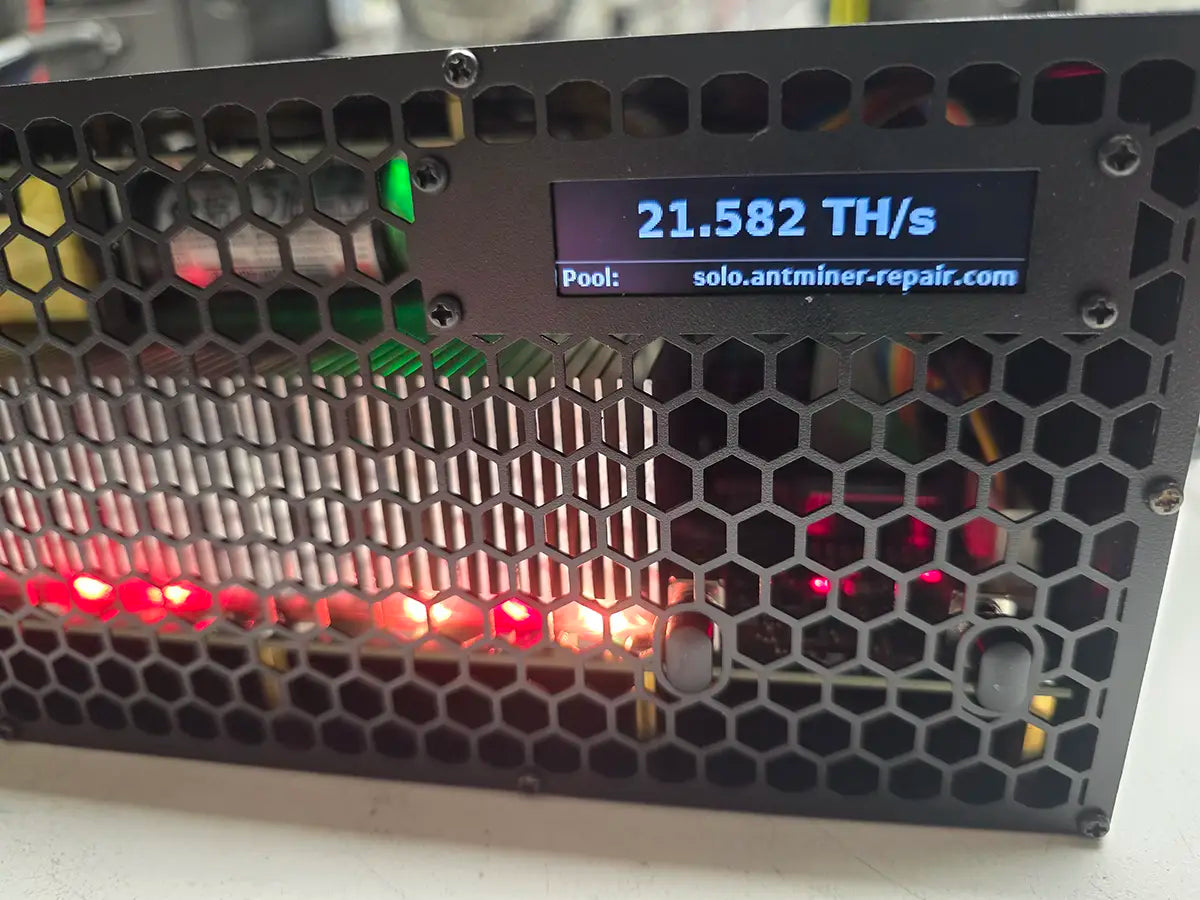
GekkoScience KBox repair fixes the faults owners report most: no sign of life at the wall, a hashrate that sinks from 22 to about 17 TH/s on High, and a miner console that finds fewer than 18 BM1370 chips. A healthy KBox reports all 18; any other count is a fault. Complete-unit repair in the USA, proven under load.
GekkoScience KBox repair usually begins with one of two complaints: a unit plugged in and showing nothing at all, or one still glowing and hashing but well short of the 22 TH/s it was bought for. Our USA lab treats the machine as the single system it is — one internal board with 18 BM1370 chips, the integrated Mean Well power supply, the Linux controller with its stats screen, and the two fans behind the faceplate. This is a complete SHA-256 Bitcoin miner in its own steel and aluminum case, not a removable hashboard, so it is diagnosed, repaired and validated as a whole. You do not need to work out which part of it failed before you contact us.
Technical Diagnostics and Common Issues with GekkoScience KBox
Quick Symptom Checklist
The lines below are reproduced the way the KBox shows them. Counts and numbers differ from unit to unit; the shape of the message is what to match.
- The unit is plugged in and switched on at the rear, and nothing happens: no fans, no screen, no network. Or a green light is on, but the miner never starts.
- Hashrate drops from about 22 TH/s to 16–17 TH/s while the unit is still set to High, and changing modes does nothing.
- The miner console reports fewer than 18 chips, for example
BM1370:12T [oooooooooooo]— everyois a chip that answered, and a healthy KBox shows 18 of them. Hashrate sits far below every preset and hardware errors climb quickly. - The front screen shows
IP: n/aandwifi signal 1%, or the dashboard cannot be reached while the unit keeps hashing. - The dashboard shows a
CGMINER Configuration Issuebanner, orSTRATUM BLOCKED, or says the miner is not mining while hashing continues. - The unit runs hot and loud on High and slows itself down; ASIC temperature climbs into the low 70s °C before the fans catch up.

Try This Before You Ship It In
Each of these takes a few minutes and none of them needs the case opened. If none of them changes anything, the fault is in the hardware and the rest of this page describes what we do about it.
- Power the unit down completely with the switch on the rear and leave it off for about five minutes before switching it back on. A restart from the dashboard is not the same thing.
- Toggle the power mode on the front of the miner, or with the remote, and set High again. After a restart the KBox can come back in Low, which looks like lost hashrate.
- Plug in an Ethernet cable. If the unit went silent on Wi-Fi, a wired connection usually brings the dashboard back within minutes without a reboot.
- Check the pool address, port and worker. The address needs a host as well as a port, and solo pools expect your Bitcoin address as the worker name.
- Give it air. Keep the rear fans and the front faceplate clear and do not run the unit in a closed cabinet or a tight shelf.
- Update the firmware from the dashboard and return the presets to factory values if they were tuned.
- Open the miner console in the dashboard and count the chips. Eighteen means the board is answering. Fewer than eighteen is a hardware fault, and no setting or update will bring the missing chips back.
Model-Specific Patterns We See on GekkoScience KBox
No sign of life at the wall. The KBox on our own bench arrived exactly like this: plugged in, switched on, and nothing — no fans, no screen, no light worth reading. Owners also describe a variant where a green light is on but the miner never powers up, often after the presets were pushed past their factory limits. From the outside it looks like a dead controller or a corrupted system card. It is a hardware fault inside the case, and separating its possible causes is bench work; this is not something a reflash or a reset brings back.
22 TH/s that quietly becomes 17. The most common complaint across owner reports: the unit runs at full output for a while, then settles around 16–17 TH/s while the dashboard still says High, and mode changes do nothing. A restart often brings it back, which points at controller or firmware state rather than the board. But the same picture also appears when the chips reach the firmware's temperature limit in the low 70s °C and the fans react too slowly — a thermal throttle that looks exactly like a software glitch. We tell the two apart under load before anything is replaced.
Fewer than 18 chips, and no alarm. A KBox that finds only part of its chips does not raise a warning. It simply hashes at a fraction of every preset — around 7 TH/s on Low and 9–10 on Medium in the case owners documented — while hardware errors accumulate and the pool accepts what little arrives. Owners reasonably suspect tuning or firmware. The miner console tells the truth: a chip count below 18 is the board. The 18 chips are powered as nine pairs, so a loss on this board tends to arrive in a step rather than a slow decline.

A network drop that looks like a dead miner. Wi-Fi on the KBox runs through a USB adapter. When it drops out, the front screen freezes on the last hashrate or shows IP: n/a, the dashboard disappears, and the unit looks dead — while it is still hashing. A wired connection settles which of the two it is. The Wi-Fi antenna on the rear is also easy to snap off when the unit is moved.
Alarming numbers that are not faults. The dashboard and third-party monitoring apps can show hardware errors in the millions and an accepted-share count far above what the pool reports. On a healthy unit both are normal: the counters include the chips' internal results, not only the shares your pool accepted. A rising hardware-error count matters when it comes with a missing chip count or a hashrate below the preset, and not on its own.
Hardware Notes
| Specification | Details |
|---|---|
| Algorithm | SHA-256 |
| Coin(s) targeted | Bitcoin (BTC); the pool is set by the owner, solo or shared |
| Device type | Complete self-contained home miner and room heater: board, power supply, controller and fans in one case. Not a plug-in board for a larger chassis |
| Enclosure format | Fully enclosed steel and aluminum case, 11 × 15 × 25 cm, hexagonal-grid faceplate, RGB lighting |
| ASIC chips | 18 × BM1370 on one internal board; a healthy unit shows all 18 in the miner console |
| Domain structure | 9 domains of 2 chips |
| Rated hashrate | Presets High 22 TH/s, Medium 16 TH/s, Low 10 TH/s (user-editable). 21.9 TH/s at about 297 W measured on High on the unit we serviced |
| Controller platform | Integrated Linux controller; Ethernet plus 2.4/5 GHz Wi-Fi through a USB adapter; front stats screen; service button next to the rear power switch |
| Firmware | GekkoScience KBox firmware: a closed web dashboard running on top of the open-source cgminer. Updated by the owner from the dashboard. The hardware design is GekkoScience's own and is not open-source |
| Cooling | Two 4-pin fans of about 90 mm at the rear, with speed control; hashing stops if either fan stops |
| Power input | Built-in Mean Well supply, 93% efficient, 120/240 V AC with a rear on/off switch; up to 330 W at the wall on High per GekkoScience |
| Built-in extra | DOOM: click the GekkoScience logo in the dashboard five times and the game loads in your browser, with the picture mirrored on the miner's own front screen |
Diagnostic Decision Tree
None of this asks you to do anything. It is here so you know what state the unit is in before deciding to ship it.
| What you see | What it usually means | What we do with it |
|---|---|---|
| Nothing at all when switched on, or a green light and no start | A hardware fault inside the case; several causes look identical from outside | We trace the power path from the wall inlet to the board and controller and repair what failed at component level |
| 22 TH/s falls to 16–17 TH/s on High; a restart brings it back | Controller or firmware state, or a thermal throttle in the low 70s °C | We run the unit under load with temperatures and fan speed logged, and separate a throttle from a software stall |
| Fewer than 18 chips in the miner console; hashrate far below every preset | Part of the chip chain is not answering — a board fault | We test the board domain by domain, replace failed BM1370 chips and recalibrate before load testing |
IP: n/a, wifi signal 1%, dashboard gone, hashing continues |
The Wi-Fi side, not the miner | We confirm on a wired connection and check the adapter and the rear antenna |
CGMINER Configuration Issue, STRATUM BLOCKED, fallback pool not saved |
Pool or dashboard configuration, very rarely hardware | We reproduce it on a known-good pool before treating it as a hardware fault, and tell you if it was configuration |
| Millions of hardware errors on a unit hashing at its preset with 18 chips | Normal counter behavior | Nothing to repair; we say so rather than open a job |
Diagnostics Focus
- Power first, chips last. A KBox that shows no life at all is traced from the wall inlet through the built-in supply to the board and the controller before any conclusion is drawn about the chips. Chip-level findings on a unit that is not being powered correctly are worthless.
- Throttle or stall, under load. The hashrate drop on this model has a software cause and a thermal cause that look the same on the dashboard. We log temperature, fan speed and hashrate together through a full run, so the repair answers the real cause and not the more convenient one.
Our Professional Repair Process
Gotchas
- A chip count is not a pass. After component-level work on the board, all 18 chips answering is where validation starts, not where it ends. The nine domains are recalibrated, and the unit has to hold its rated output on High, warm, through the whole burn-in. A KBox that merely powers on is not a repaired KBox.
- The quiet fans hide the heat. The KBox is built to be quiet enough for a living room, and that means nothing audible warns you before the chips reach their limit and the unit throttles. Every repaired unit is run in a closed-up case at full output, so a thermal problem shows up on our bench and not in your living room.
Typical Service Scenario
- A unit arrives after being plugged in and switched on with no response at all — no fans, no screen, no network. This is how the KBox on our own bench came in.
- A unit that ran at 22 TH/s for weeks and now settles at 16–17 TH/s, with restarts helping for a day at a time, in a warm room or on a shelf with little air around it.
- A unit whose owner opened the miner console and found 12 chips instead of 18 after trying every preset and every firmware update the dashboard offered.
What Happens After Intake
- Intake: we record the unit's condition, the symptoms you reported and what the front screen shows on power-up.
- Incoming inspection: the case, faceplate, rear antenna, inlet and switch are checked for shipping damage before anything is powered.
- Diagnostics: power path first, then the controller and dashboard, then the chip chain domain by domain under load.
- Component-level repair: failed power components, connectors, damaged traces and failed BM1370 chips are repaired or replaced on the board.
- Cleaning and thermal interface replacement: the board is cleaned and the thermal interface renewed before validation.
- Validation: through the KBox's own dashboard, miner console and front screen, on a real pool: all 18 chips answering, rated hashrate on High, fan speed and temperatures normal, then a burn-in of at least 2 hours under real mining load. Extended burn-in is available as a separate add-on.
Diagnostics & Validation Equipment
Bench power diagnostics, multimeter fault isolation, thermal inspection under load, and the KBox's own diagnostic surface: the web dashboard with its charts, the miner console, and the stats screen on the front of the unit. Bench testers built for loose boards from rack miners do not apply to a complete unit like this one and are not used on it; final validation is the device hashing on a real pool.

All repairs are performed personally by Alex, who has been servicing ASIC miners since 2019. See credentials →
Contact our repair team today and get your miner back to full power.